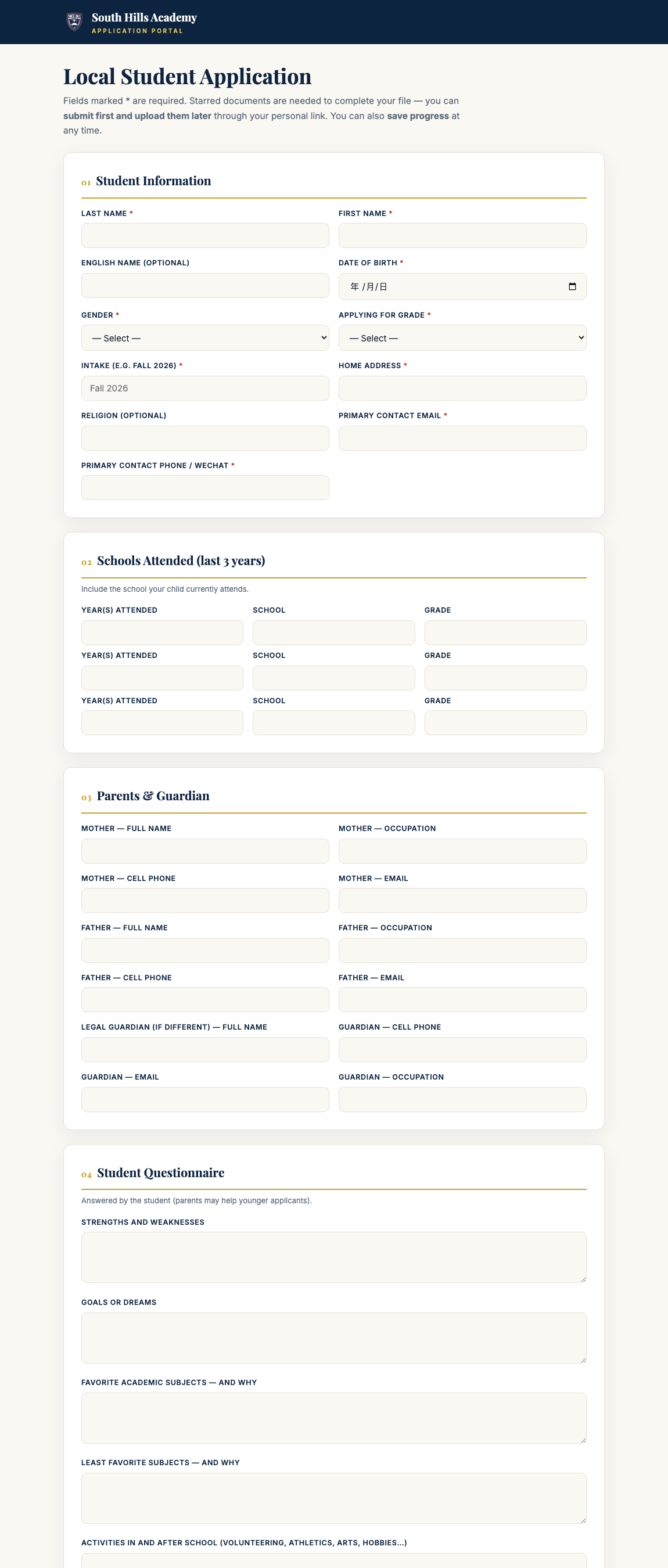
Open apply.shacademy.org/apply/local — the same full application international families use, about 10 minutes.打开 apply.shacademy.org/apply/local——和国际生同一套完整申请表,大约 10 分钟。
Fields marked * are required; start with Student Information and Parents & Guardian.带 * 的是必填项;先填学生信息(Student Information)和家长信息(Parents & Guardian)。
Documents: report cards and the birth certificate complete the file — but you can submit first and upload them later.材料:成绩单和出生证明交齐档案才算完整——但可以先提交,之后再补传。
After you submit, the confirmation email carries your personal link: track your status, see each enrollment step, and upload anything missing — no need to start over.提交后,确认邮件里有你的专属链接:随时查看进度和录取步骤,缺什么直接补传,不用重新填表。
The local application — Student Information on top, then schools attended, parents, the student questionnaire, and document uploads本地申请表——最上面是学生信息,往下依次是就读学校、家长信息、学生问答和材料上传
Your application lands directly on the admissions team's board — they follow up within 1–2 school days to schedule your campus visit and interview.你的申请直接进入招生团队的看板——他们会在 1–2 个工作日内联系你,安排到访和面谈。
Students — sign in with your school email学生——用学校邮箱登录
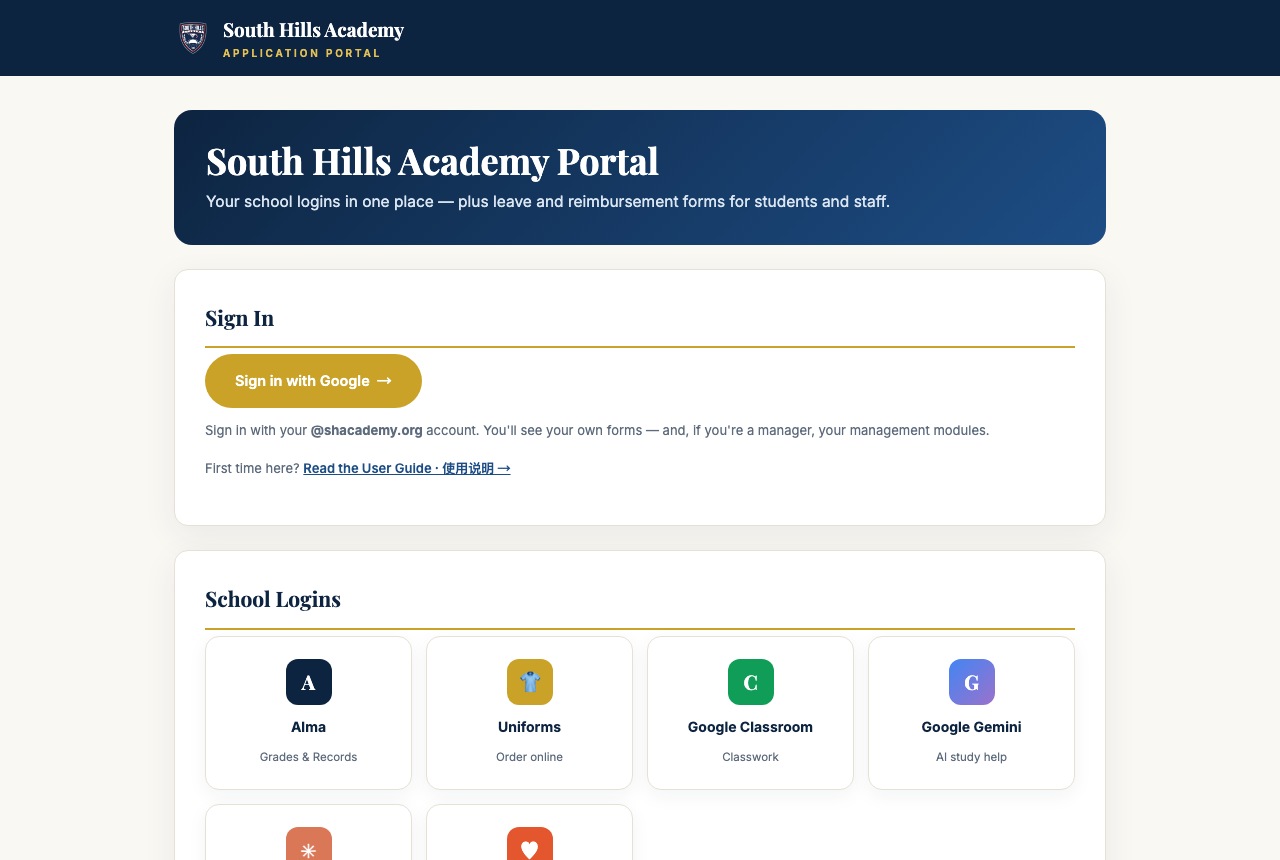
Open apply.shacademy.org/portal and press Sign in with Google, using your @shacademy.org account.打开 apply.shacademy.org/portal,点 Sign in with Google,用你的 @shacademy.org 学校账号登录。
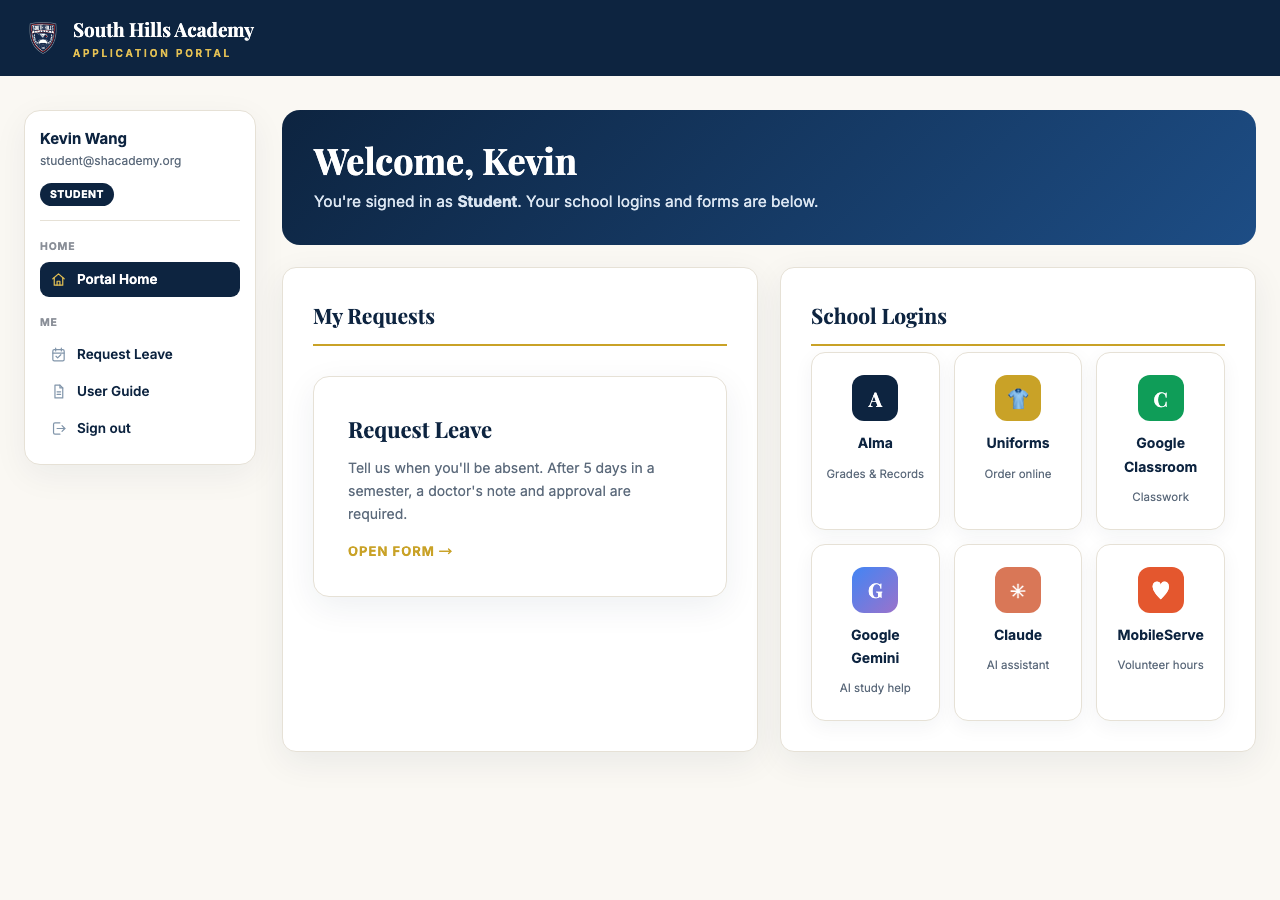
You'll see Request Leave (5 self-serve days per semester; after that, a doctor's note and approval are required) and School Logins — one-click buttons to Alma, Uniforms, Google Classroom, Gemini, Claude, and MobileServe.登录后能看到 Request Leave 请假(每学期 5 天自助额度,超过需医生证明和审批)和 School Logins 学校常用入口——一键直达 Alma、校服订购、Google Classroom、Gemini、Claude 和 MobileServe。
The sign-in screen — press the gold button and pick your school account登录页——点金色按钮,选择你的学校账号A student's home page: Request Leave on the left, every school login on the right学生首页:左边是请假,右边是全部学校常用入口
Part 2 · All Staff第 2 部分 · 全体员工
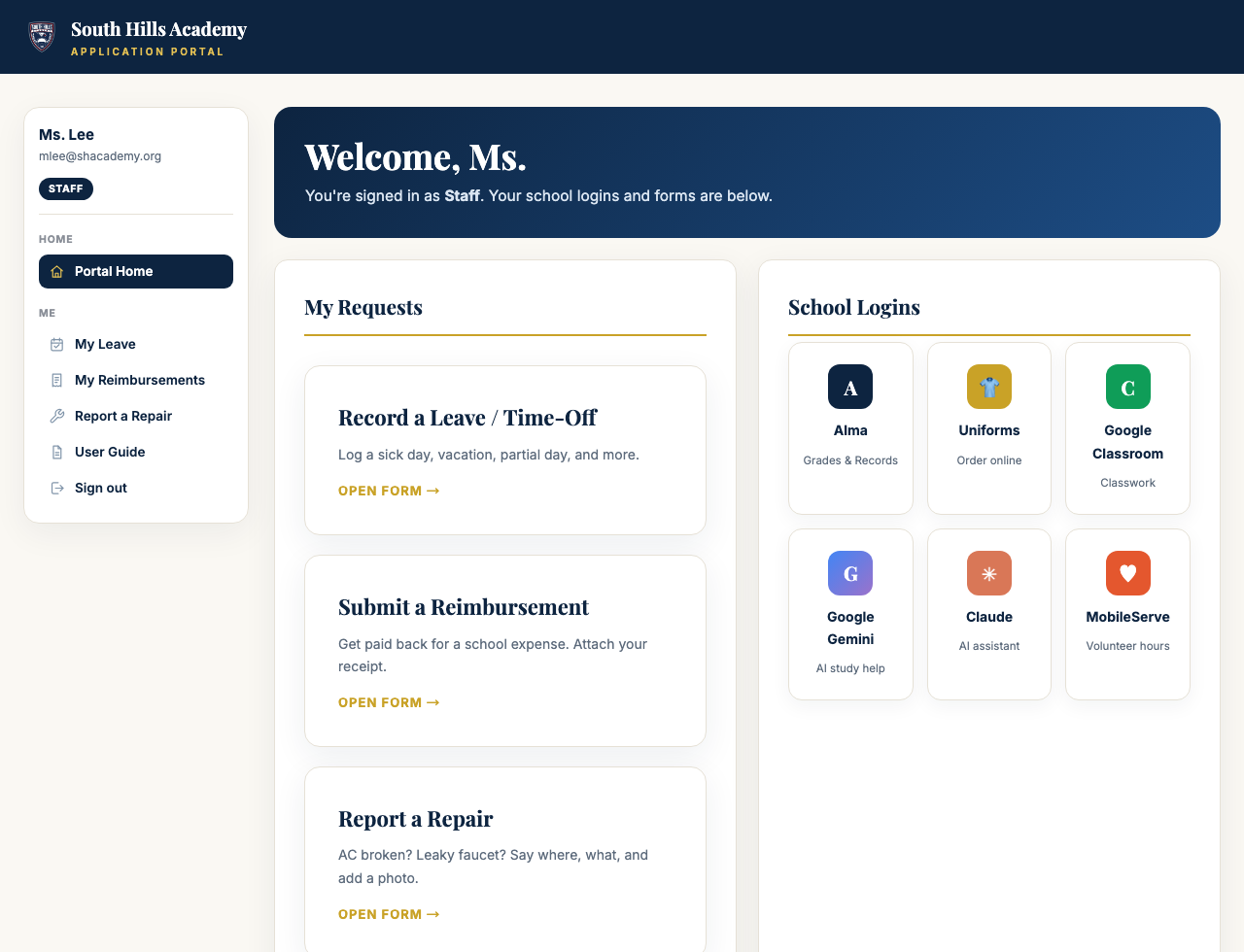
Sign in at apply.shacademy.org/portal with your @shacademy.org Google account. Every employee gets the three self-service forms below — no special permission needed. Find them in the left menu under Me, or in My Requests on your home page.用你的 @shacademy.org Google 账号登录 apply.shacademy.org/portal。每位员工都有下面三个自助表单,不需要任何特殊权限——在左侧菜单的 Me 分组,或首页的 My Requests 卡片里。
A staff home page: your three forms in the middle, school logins beside them, menu on the left员工首页:中间是你的三个表单,旁边是学校常用入口,左侧是菜单
1 · Record a Leave / Time-Off1 · 登记请假
In the left menu, click My Leave.在左侧菜单点 My Leave。
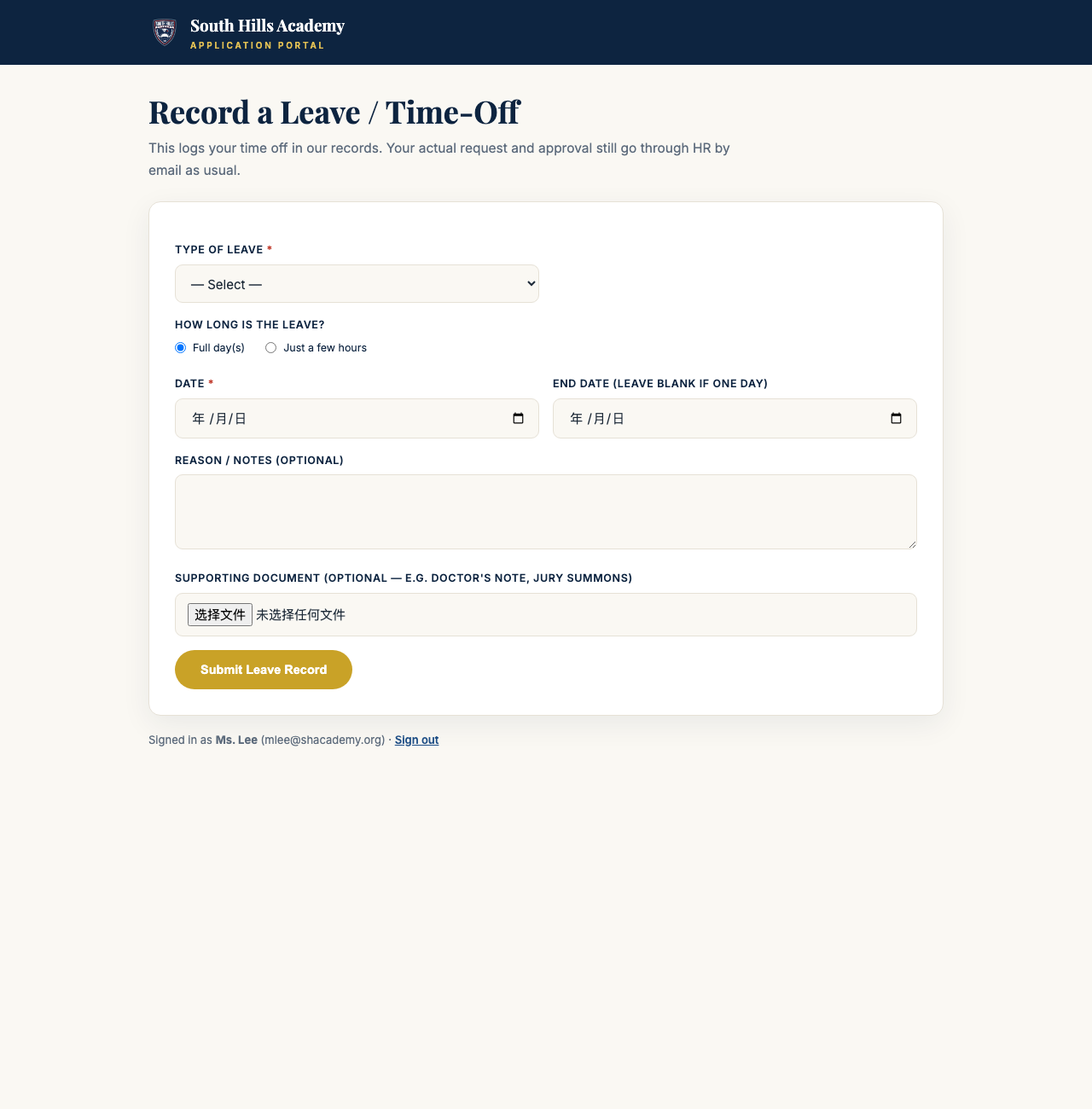
Pick the type (sick, vacation, personal…), choose full day(s) or just a few hours, and set the date.选择类型(病假、休假、事假…),选整天或按小时,再选日期。
Attach a doctor's note if you have one, then press Submit Leave Record.有医生证明就附上,然后点 Submit Leave Record 提交。
The leave form — type, dates, an optional document, one button请假表——类型、日期、选填的证明文件,一个提交按钮
This logs your time off in school records so HR and payroll are accurate. Your approval conversation with your supervisor still happens as usual.这一步是把请假记录进学校档案,保证人事和工资核算准确。跟主管的请假沟通照常进行,不被取代。
2 · Submit a Reimbursement2 · 提交报销
In the left menu, click My Reimbursements.在左侧菜单点 My Reimbursements。
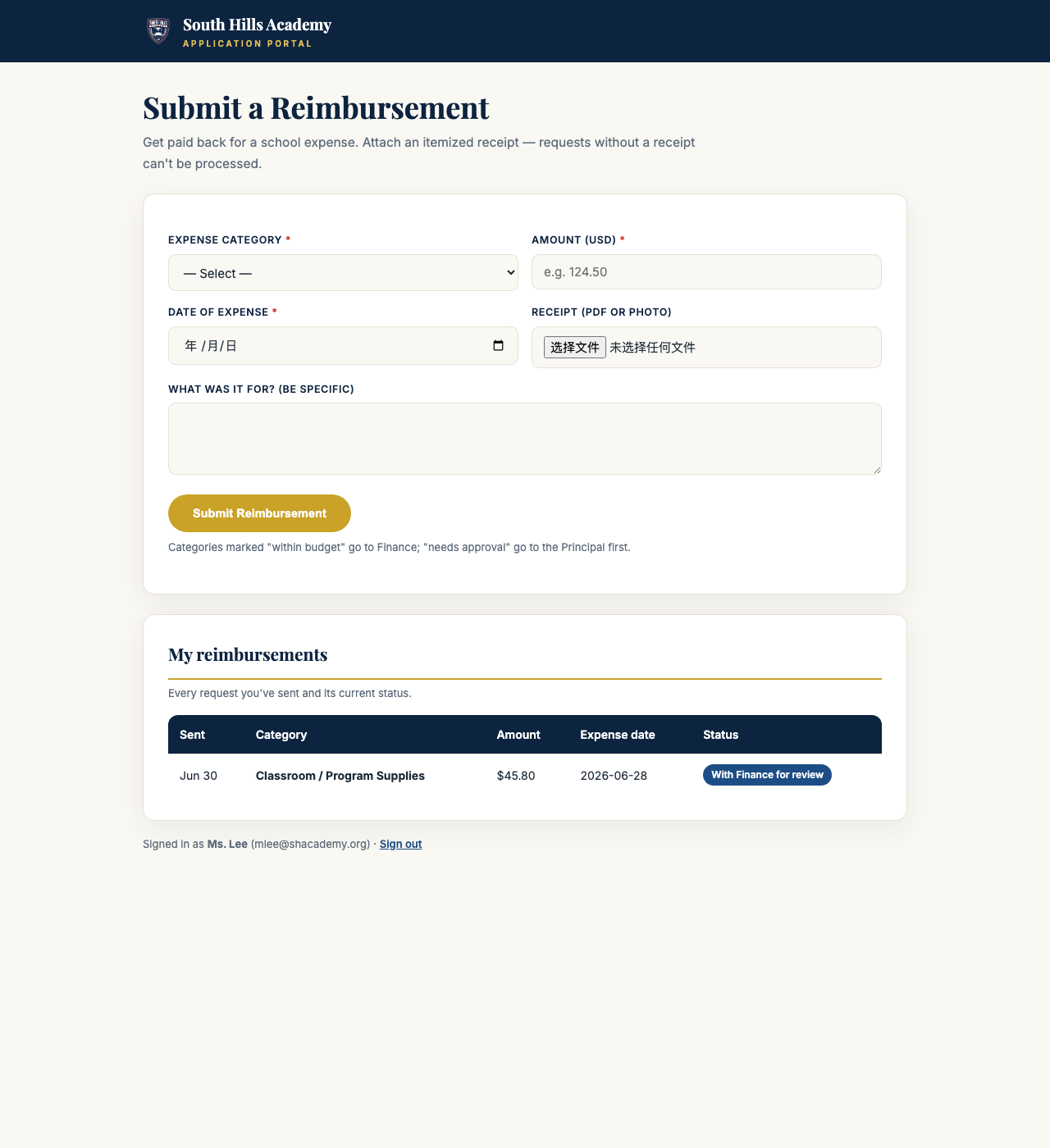
Pick the category, enter the amount and date, and attach the itemized receipt — requests without a receipt can't be processed.选类别,填金额和日期,并且必须附上明细小票——没有小票无法处理。
Press Submit Reimbursement and watch its progress on the same page. Everyday categories (classroom or office supplies, mileage, meals, field trips) go to Finance; travel, technology, and professional development go to the Principal first; anything over $200 — or once you pass $500 for the school year — also gets Board sign-off. Then Finance pays.点 Submit Reimbursement 提交后,在同一页就能看进度。日常类别(教具、办公用品、里程、餐费、外出活动)直接走财务;差旅、技术设备、职业发展先经校长;单笔超 $200、或本学年累计超 $500 的还需董事会签批,最后由财务付款。
The reimbursement form — category, amount, receipt, and below it a list of everything you've sent and where it stands报销表——类别、金额、小票;下方是你提交过的每一笔和当前进度
3 · Report a Repair3 · 报修
In the left menu, click Report a Repair.在左侧菜单点 Report a Repair。
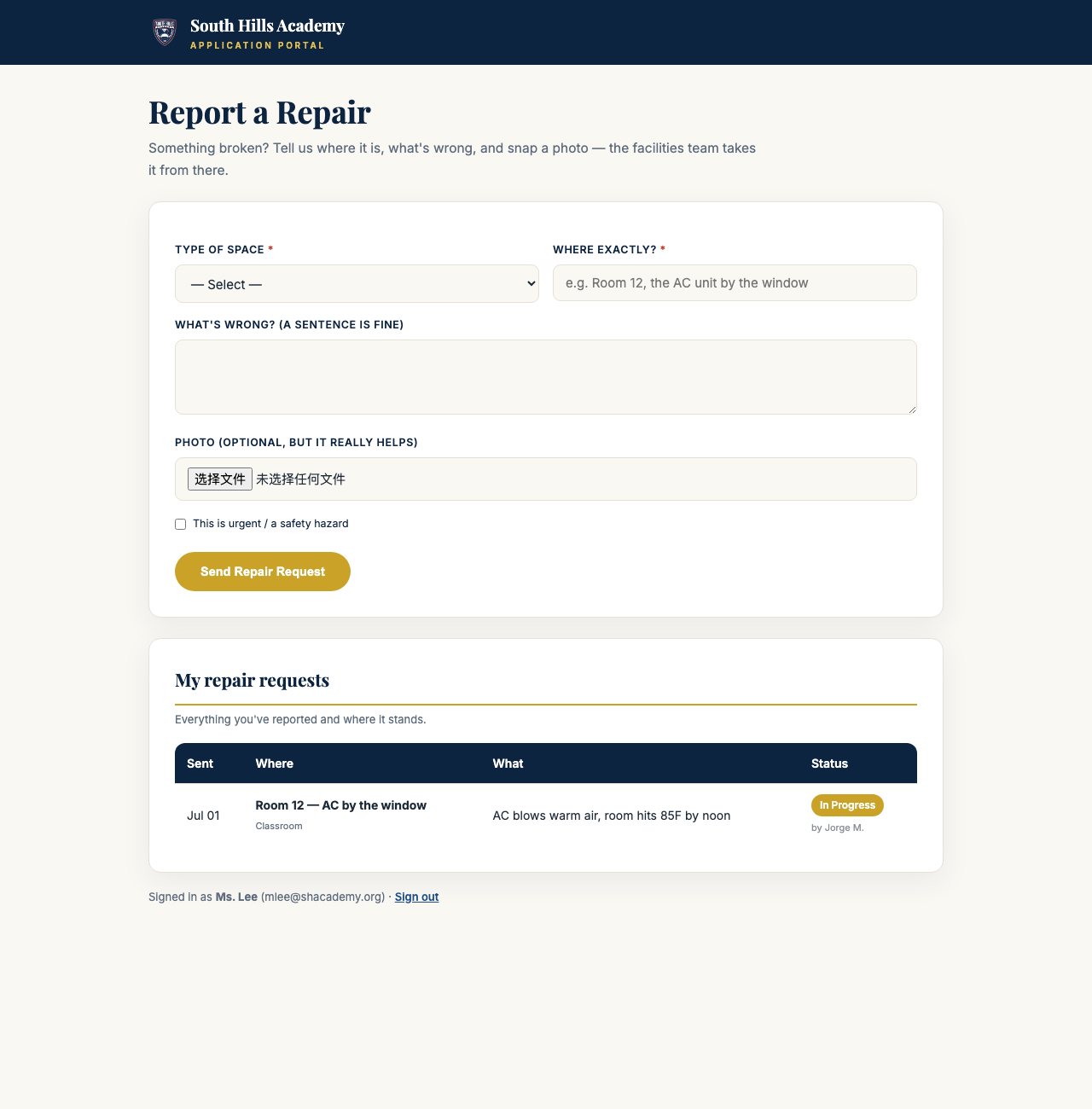
Pick the type of space, type where exactly, and one sentence on what's wrong.选场所类型,写清楚具体位置,再用一句话描述问题。
Snap a photo (optional, but it really helps), tick urgent if it's a safety hazard, and press Send Repair Request.拍张照片(选填,但很有帮助),如有安全隐患勾选 urgent 加急,然后点 Send Repair Request 发送。
The repair form — and below it, the status of everything you've reported (who's on it, whether it's fixed)报修表——下方是你报过的每一项的状态(谁在处理、是否修好)
Example — Room 12's AC breaks例子——12 教室空调坏了
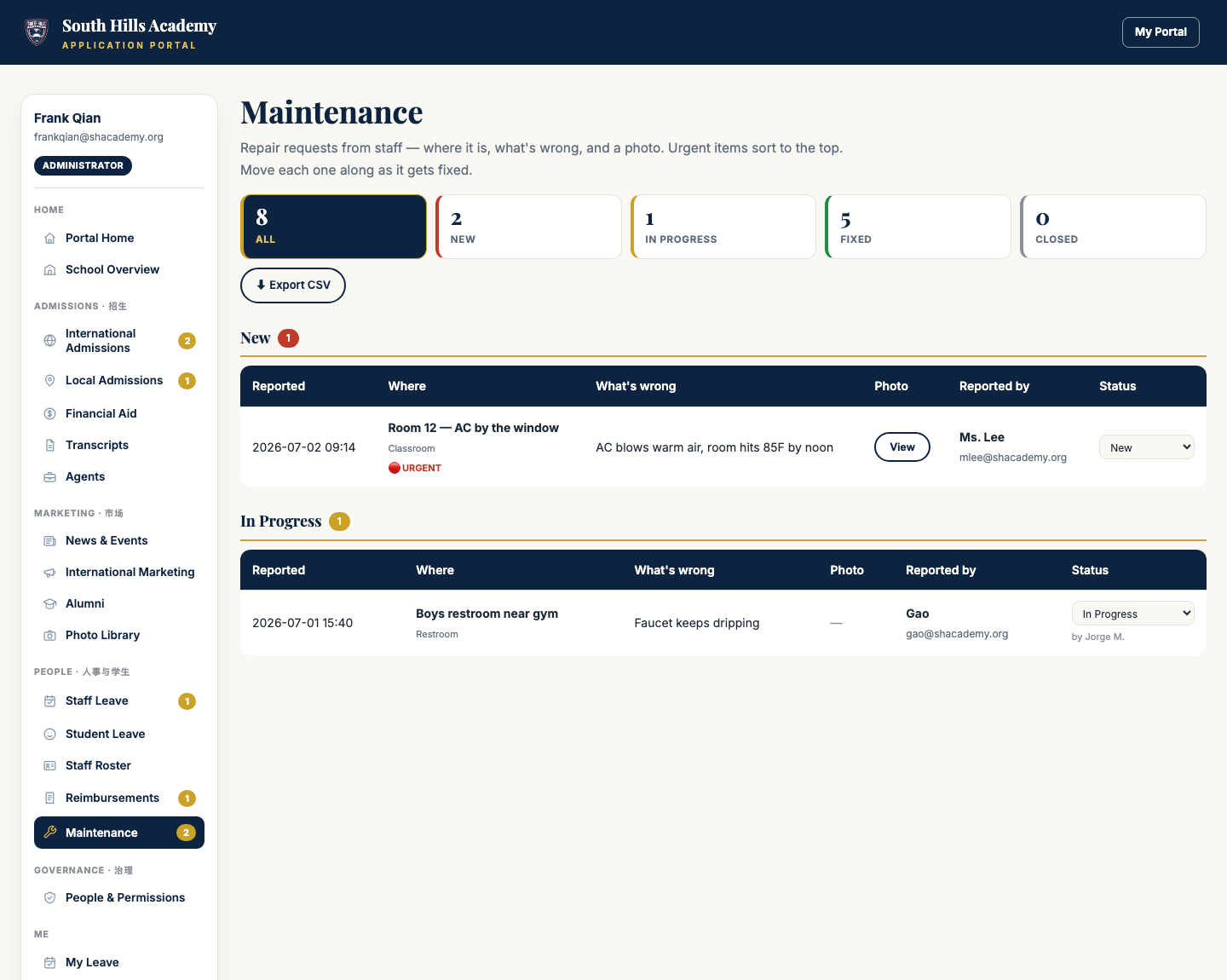
Ms. Lee picks Classroom, types “Room 12 — the AC unit by the window,” writes “Blowing warm air, room hits 85°F by noon,” attaches a photo, ticks urgent, and presses Send. The facilities team sees it at the top of their board (urgent sorts first) and moves it to In Progress — when it's repaired, Ms. Lee sees Fixed on her own page. No follow-up emails.Ms. Lee 选 Classroom(教室),位置填 12 教室靠窗那台空调,问题写吹出来是热风、中午室温到 85°F,附一张照片,勾选 urgent,点发送。维修团队的看板上这条自动排在最顶(加急优先),他们改成 In Progress 处理中——修好后 Ms. Lee 在自己页面上看到 Fixed 已修复。全程不用发一封追问邮件。
Part 3 · Managers第 3 部分 · 管理者
If you manage a department, your left menu shows extra sections. You only see the modules you've been granted — if something is missing, ask Frank to add it in People & Permissions.如果你管理某个部门,左侧菜单会多出对应分组。你只能看到已授权给你的模块——缺什么就找 Frank 在 People & Permissions 里加。
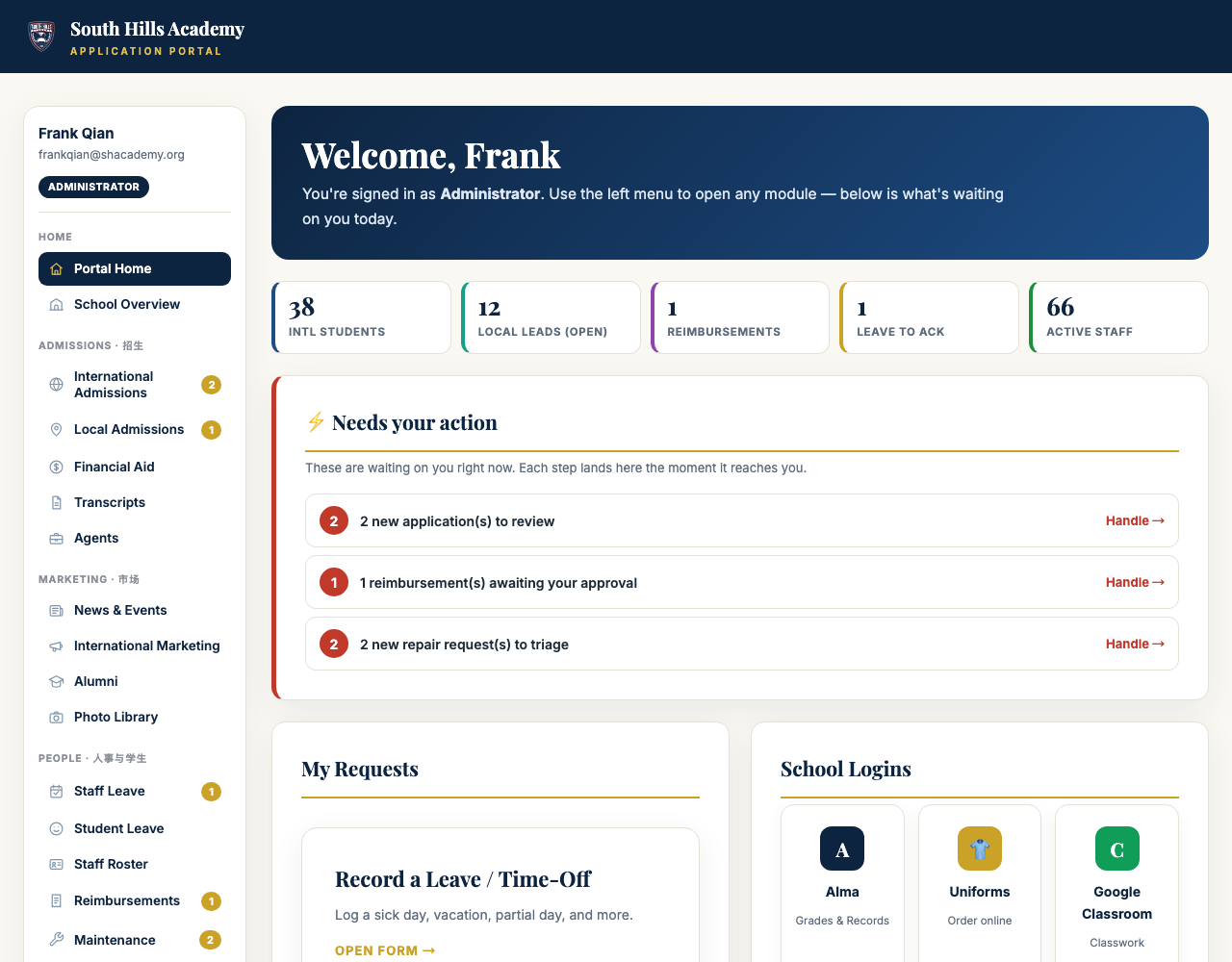
Your home page = your to-do list你的首页就是你的待办清单
⚡ Needs your action — everything waiting on you: new applications, reimbursements at your approval step, repairs to triage. Press Handle and you land exactly where the work is.⚡ Needs your action——所有等你处理的事:新申请、到你这一步的报销、待分派的报修。点 Handle 直接跳到要处理的地方。
The number cards (school leadership only) — a whole-school snapshot; every number is clickable.数字卡片(仅校领导可见)——全校一览,每个数字都能点进去。
A manager's home: number cards on top, the ⚡ list in the middle — if that list is empty, you're all caught up管理者首页:顶部数字卡片,中间 ⚡ 待办清单——清单为空就说明没有积压
You don't have to check six boards every morning. The moment something needs you, it appears on this list — and every morning at 7:00 the portal also emails leadership a Daily Digest (preview it under /admin/digest).你不用每天早上挨个翻六个看板。任何事一旦需要你,就会出现在这张清单上——每天早上 7 点门户还会自动给校领导发一封运营日报(可在 /admin/digest 预览)。
How every board works (they all work the same way)看板怎么用(所有看板操作一致)
Open your module in the left menu — a gold number on it means new items.在左侧菜单打开你的模块——菜单上的金色数字表示有新事项。
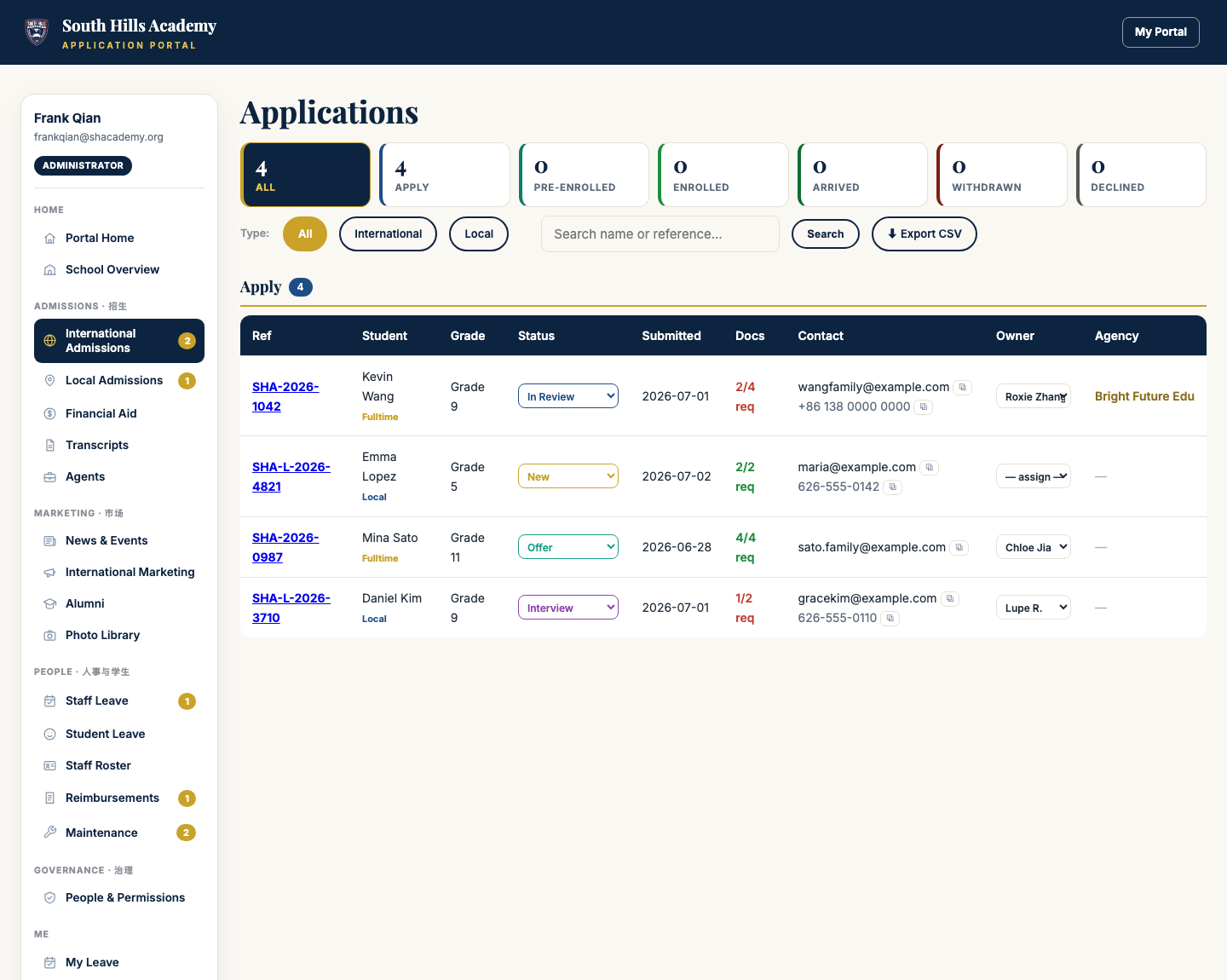
The colored cards on top are the pipeline. Click a card to filter to that group.顶部的彩色卡片就是流程阶段,点某张卡片即可只看那一组。
Change the status right on the row — the dropdown saves instantly, with your name recorded.直接在行内下拉框改状态——立即保存,并记录是谁改的。
On the Applications board: the Type tabs switch All / International / Local, each row has an Owner dropdown to assign a teammate, and ⧉ copies an email or phone number in one click.在申请看板上:Type 标签切换全部/国际/本地,每行的 Owner 下拉可指定负责人,⧉ 按钮一键复制邮箱或电话。
Preview opens attached documents right on the page (Download saves a copy); Export CSV downloads the whole list as a spreadsheet.Preview 就地预览附件(Download 下载副本);Export CSV 把整个列表导出成表格。
The Applications board — pipeline cards on top, Type tabs (All / International / Local), and on every row a status dropdown, an owner, and copy buttons申请看板——顶部流程卡片,Type 标签(全部/国际/本地),每行都有状态下拉、负责人和复制按钮The Maintenance board — urgent items are flagged red and sort to the top维修看板——加急项标红并排在最顶
All applications — international and local on one board; use the Type tabs. After a local family pays, complete enrollment in Alma.全部申请——国际+本地同一看板,用 Type 标签切换。本地家庭缴费后,在 Alma 完成注册。
Add staff and set who can view or edit each module (administrator only)添加员工、设置每个模块谁能看谁能改(仅管理员)
Example — a local application, start to finish例子——一份本地申请的完整流程
Maria submits Emma's Grade 5 application. It appears on the Applications board under New with a Local chip — and on the admissions manager's ⚡ list.Maria 为 Emma 提交了 5 年级申请。它出现在 Applications 看板的 New 一栏,学生名下带 Local 标签——同时出现在招生负责人的 ⚡ 清单上。
The manager opens the application, previews the report cards, calls Maria, and moves the dropdown to Interview.负责人点开申请,就地预览成绩单,给 Maria 打电话,然后把状态改成 Interview。
The visit goes well → Offer, and the office sends tuition details.面谈顺利 → 改成 Offer,办公室发出学费信息。
The family pays → the office completes enrollment in Alma and marks the application Enrolled. Every step and every name, on one board.家庭缴费 → 办公室在 Alma 完成注册,状态改为 Enrolled。每一步、每个经手人,都在同一块看板上。
Tip: On a phone, the left menu tucks away — tap ☰ Menu at the top right.提示:手机上左侧菜单会收起来——点右上角的 ☰ Menu 展开。
Tip: If a page looks out of date, refresh once (on a computer, hold Shift while refreshing).提示:页面内容看起来不是最新的,刷新一次即可(电脑上按住 Shift 再刷新)。
Tip: This guide is always one click away — User Guide in the left menu, or apply.shacademy.org/guide.提示:这份指南随时可看——左侧菜单的 User Guide,或直接访问 apply.shacademy.org/guide。
South Hills Academy · 1600 E Francisquito Ave, West Covina, CA 91791 · (626) 919-2000 · admissions@shacademy.org
 SHA Portal · User Guide南山学校门户 · 使用说明
My Portal回门户
SHA Portal · User Guide南山学校门户 · 使用说明
My Portal回门户